
Adjusting what is on screen
Most adjustments apply to the wallpaper that is playing rather than to the library as a whole. Two places control that: the counter at the bottom of the sidebar, which opens the Control Panel, and the Customise panel for the individual wallpaper.
The active wallpaper counter
It reads 1 Active Wallpaper(s) and counts the screens currently playing a wallpaper. Click it to open the Control Panel; the first time a wallpaper starts, the app shows a hint there as well.
A card for each monitor showing what is playing on it, or No Wallpaper, plus the placement method and two buttons: Close Wallpapers stops playback on the selected screen, and Customise Wallpaper opens the settings for the wallpaper on that screen.
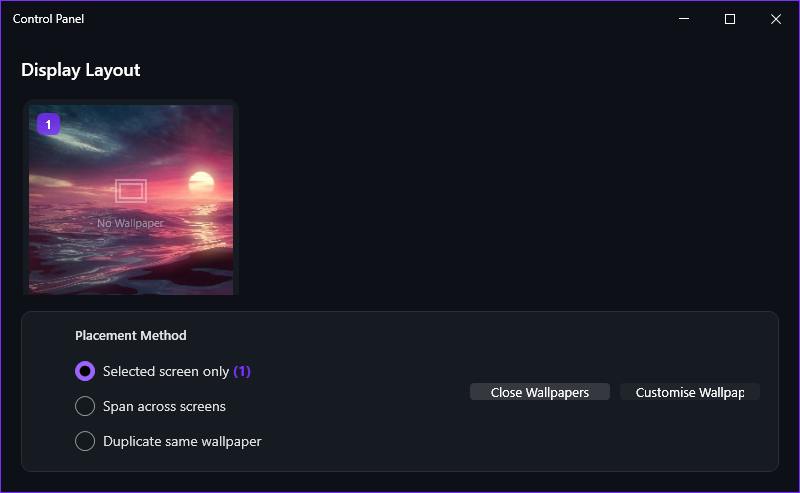
Per-wallpaper settings
Right-click its tile in the Library and choose Customise, or select its screen in the Control Panel and click Customise Wallpaper. A wallpaper that publishes no adjustable options opens no window at all - that is normal, not a failure.
Whatever that wallpaper exposes. Web and application wallpapers often publish sliders for colour, speed or layout, and wallpapers with sound usually carry their own volume. For sound across every wallpaper, use the master level on Settings > Audio instead.
Trying before you commit
Yes. Right-click a Library tile, or use the Favorites page, and choose Preview to open a preview window: the wallpaper plays there while your desktop keeps whatever is currently on it. Close the window when you have seen enough.
Only while the preview window is open. Closing it stops the preview and leaves the desktop wallpaper exactly as it was.