
Running quietly in the background
The app is designed to sit in the notification area and get out of the way: it starts with Windows, keeps the wallpaper playing when the window is closed, and offers a short menu for the things you need most often.
The tray icon and its menu
Wallpaper Lively X appears in the notification area next to the clock. The icon is in colour while wallpapers are playing and turns grey when they are paused, and double-clicking it brings the main window back.
Right-click the icon:
- Open Wallpaper - show the main window.
- Pause Wallpapers - suspend playback; a tick appears next to the item and the icon goes grey.
- Change Wallpapers - load the next wallpaper in your Library.
- Exit - close the app and stop the wallpaper.
Turn off System-tray Icon in Settings > Misc. The app keeps running and the wallpaper keeps playing, you just lose the menu - so getting the window back means starting Wallpaper Lively X from the Start menu again.
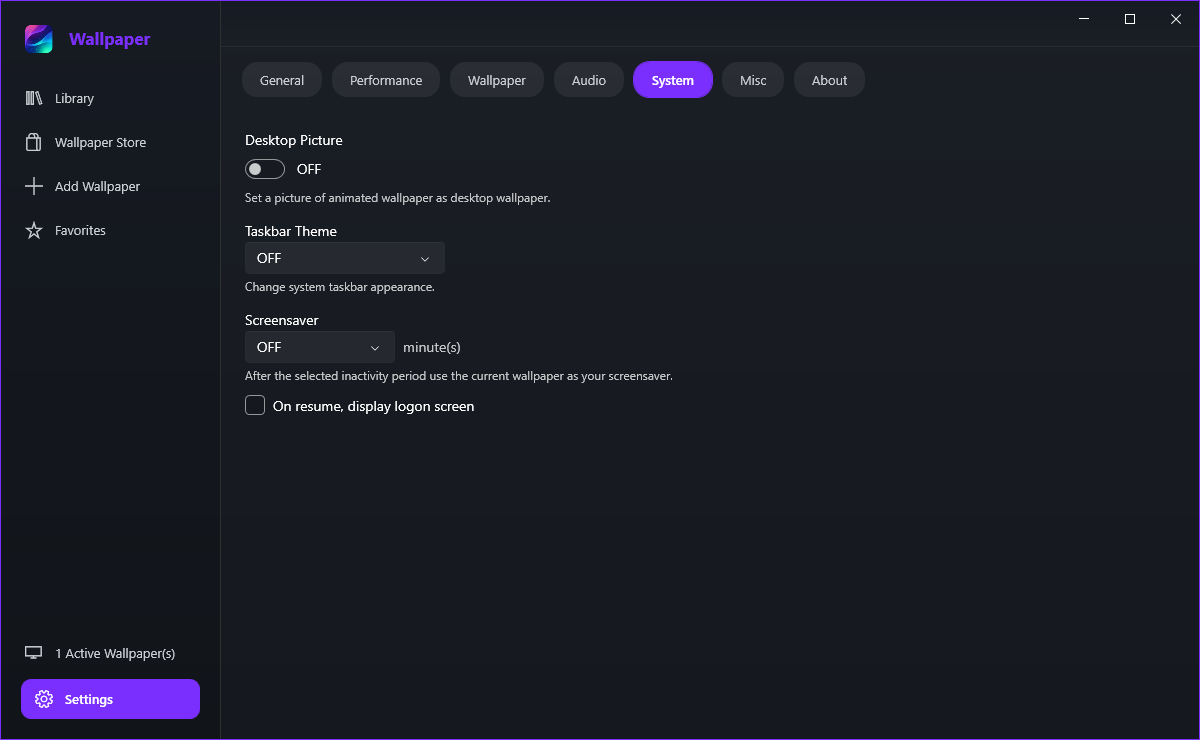
Desktop picture, taskbar and screensaver
It sets a still picture taken from the animated wallpaper as your real Windows desktop background, so tools that read the desktop picture see something that matches. It is off by default and it is additional to the live wallpaper, not a replacement for it.
Taskbar Theme tints the Windows taskbar to follow the wallpaper: Clear, Blur, Fluent, Wallpaper, Wallpaper Fluent or a fixed Color. If another program has already taken over the taskbar, the app disables the option rather than fighting with it.
Yes. Set Screensaver to an idle period and after that many minutes without input the current wallpaper takes over the screen. Tick On resume, display logon screen if you also want the PC locked when you come back, exactly as a normal screensaver would do.
Starting with Windows
Turn on Start with Windows in Settings > General. The app then runs in the background from logon and restores the wallpaper you had, without you opening the window - the switch lives on the General tab rather than this one.
Not to the wallpaper, which keeps playing either way. It does make the pause and next-wallpaper shortcuts harder to reach, so dragging the icon back onto the taskbar is worth the two seconds.