
What the store gives you
The Wallpaper Store tab is a browsable catalogue of ready-made wallpapers - video, web page and image - grouped into categories. Anything you download lands in your Library and stays there.
Browsing the catalogue
Select Wallpaper Store in the sidebar. The header counts what you are looking at - for example Discover 525 wallpapers on the full catalogue - and the wide banner underneath cycles through the current picks. Use the left and right arrows on the banner, or the dots below it, to move through them.
Two rows of chips narrow the catalogue. The first row is the category: All, Cartoon, Movies, Nature, Games, Architecture, Science-Fiction, Aestheticism, Webpage and Sports. The second row is the content type: All Types, Video, Webpage and Image.
Type into Search wallpapers... and the grid filters as you type. The dropdown next to it sorts the results by Popular, Newest or Downloads. If a combination matches nothing, the grid says No wallpapers match your filters. - drop a chip or clear the search and the list returns.
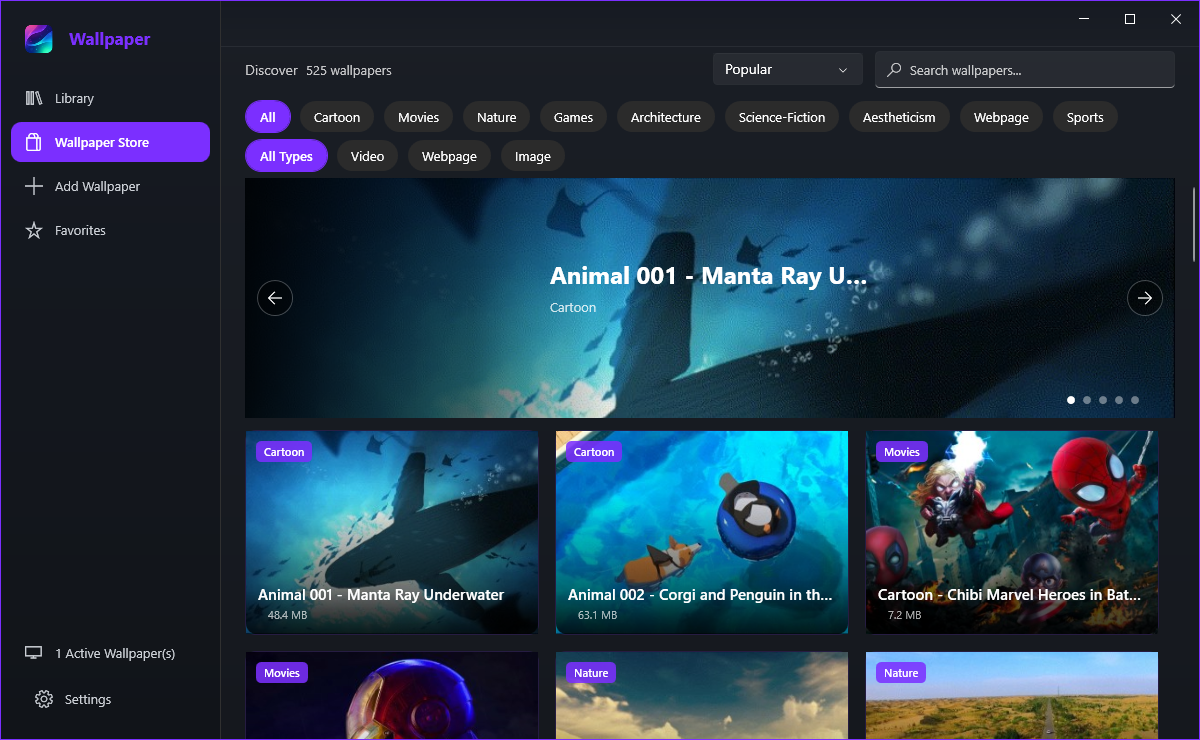
Reading the cards
- Category badge, top left - the category the wallpaper belongs to.
- Premium, gold, with a small crown - the wallpaper needs an active Premium plan before it can be downloaded.
- Installed, green tick, top right - the wallpaper is already in your Library on this PC.
Each card also shows the download size, for example 48.4 MB, so you know what a wallpaper costs you in disk space before you start.
Clicking a card opens a detail window: a large preview, the title, and the author, resolution and file size under it, with Download and Apply to Desktop buttons at the bottom. Premium wallpapers open the Premium dialog instead while no plan is active.
Downloading a wallpaper
There are two routes to the same result:
- Click the small download arrow on the card to pull the wallpaper in without leaving the grid.
- Or open the card and click Download in the detail window.
While it downloads, the card shows a progress ring and a percentage. Both windows share that state, so a download started on a card is visible in the detail window and the other way round.
Straight into your Library, in the app data folder on this PC. Once it is there it plays without an internet connection - the exception is a wallpaper that streams from a link, which needs the network to keep playing.