
它由四部分组成Four parts, one product
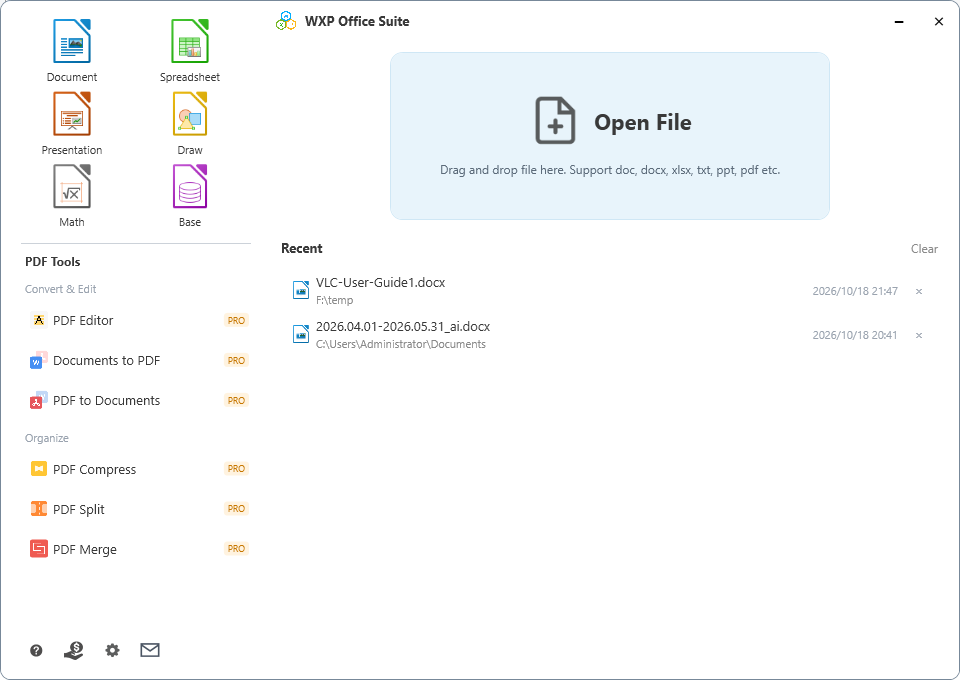
WXP Office Suite 是一套面向 Windows 的文档办公与 PDF 处理软件,安装一次即可使用全部功能:
WXP Office Suite is a document and PDF productivity suite for Windows. Install once and everything below is available:
- 主程序(外壳):统一入口,负责打开文件、新建文档、最近文件、调用 PDF 工具。Main app (shell): the single entry point for opening files, creating documents, recent files and the PDF tools.
- PDF 编辑器:独立的 PDF 阅读与编辑程序,支持批注、签名、页面管理、表单、OCR 与格式转换。PDF Editor: a separate PDF program for reading and editing — annotate, sign, manage pages, fill forms, run OCR and convert.
- PDF 转换器:Documents → PDF、PDF → Documents、压缩、拆分、合并五个工具,可在不打开文档的情况下直接处理文件。PDF Converter: Documents → PDF, PDF → Documents, compress, split and merge — works on files without opening a document.
- 办公模块:Writer / Calc / Impress / Draw / Base / Math 六个组件,兼容 doc、docx、xls、xlsx、ppt、pptx、odf、txt、csv 等格式。Office modules: Writer / Calc / Impress / Draw / Base / Math, compatible with doc, docx, xls, xlsx, ppt, pptx, odf, txt, csv and more.
提示:双击 PDF 文件会用 PDF 编辑器打开;双击 docx / xlsx / pptx 则进入办公模块。主程序会按文件类型自动分流。
Tip: Double-clicking a PDF opens the PDF Editor; double-clicking docx / xlsx / pptx opens the office module. The shell routes each file type automatically.
分章教程Tutorial chapters
按使用场景分成四章,可以按顺序阅读,也可以直接跳到你需要的部分:
The guide is split into four chapters — read them in order or jump straight to what you need:
| 章节Chapter | 内容What it covers | 适合谁Read it when |
|---|---|---|
| 1. 主程序1. Main app | 安装启动、界面分区、打开与拖放、最近文件、PDF 工具入口、免费与付费、联系反馈Install and launch, window layout, open and drag-drop, recent files, PDF entries, free vs paid, contact | 第一次使用,先看这一章Start here on day one |
| 2. PDF 编辑器2. PDF Editor | 阅读与视图、编辑文本与图像、批注签名、页面管理、表单、保护、OCR 与转换Reading and view, edit text and images, annotate and sign, pages, forms, protection, OCR and conversion | 需要改 PDF 内容或签署 PDFWhen you need to change or sign a PDF |
| 3. PDF 转换器3. PDF Converter | Documents → PDF、PDF → Documents、压缩、拆分、合并,含每一步的文件添加与输出设置Documents → PDF, PDF → Documents, compress, split, merge — including adding files and output settings | 批量转换或处理现成文件Batch converting or processing existing files |
| 4. 办公模块4. Office modules | Writer / Calc / Impress / Draw / Math / Base 六个组件,通用操作、格式兼容、导出与快捷键Writer / Calc / Impress / Draw / Math / Base plus common tasks, format compatibility, export and shortcuts | 写文档、做表格、做演示Writing documents, spreadsheets and slides |
办公模块每个组件的完整帮助(上千个主题)见 用户指南。
Complete per-module help (over a thousand topics) lives in the user guides.
系统要求与安装Requirements and installation
- Windows 10 / 11,64 位Windows 10 / 11, 64-bit
- 建议 4 GB 以上内存,2 GB 以上可用磁盘空间4 GB RAM or more, 2 GB of free disk space recommended
- 屏幕分辨率 1280 × 720 或更高Screen resolution 1280 × 720 or higher
从 Microsoft Store 安装:在 Store 中搜索 WXP Office Suite 点击「获取」,或点击本页顶部 / 左侧的商店徽标。安装与更新均由 Store 管理。
Install from the Microsoft Store: search for WXP Office Suite and click Get, or use the store badge at the top / in the sidebar. The Store handles installation and updates.
免费与付费:阅读、编辑、批注、办公模块全部免费;打印、导出 PDF,以及 PDF 编辑器的高级功能(表单、加密)与 PDF 转换器的转换 / 压缩 / 拆分 / 合并需要购买后解锁($4.99 / 月 或 $49.99 一次性,两者解锁内容相同)。
Free vs paid: reading, editing, annotating and the office modules are free. Printing, PDF export, the advanced PDF Editor features (forms, encryption) and the converter's convert / compress / split / merge tools are unlocked by a purchase ($4.99 / month or $49.99 one-time — both unlock the same set).