Interface Overview
界面概览
When you open Trio Screen Studio, you'll see the main window with several key areas:
打开 Trio Screen Studio 后,你会看到主界面包含以下几个区域:
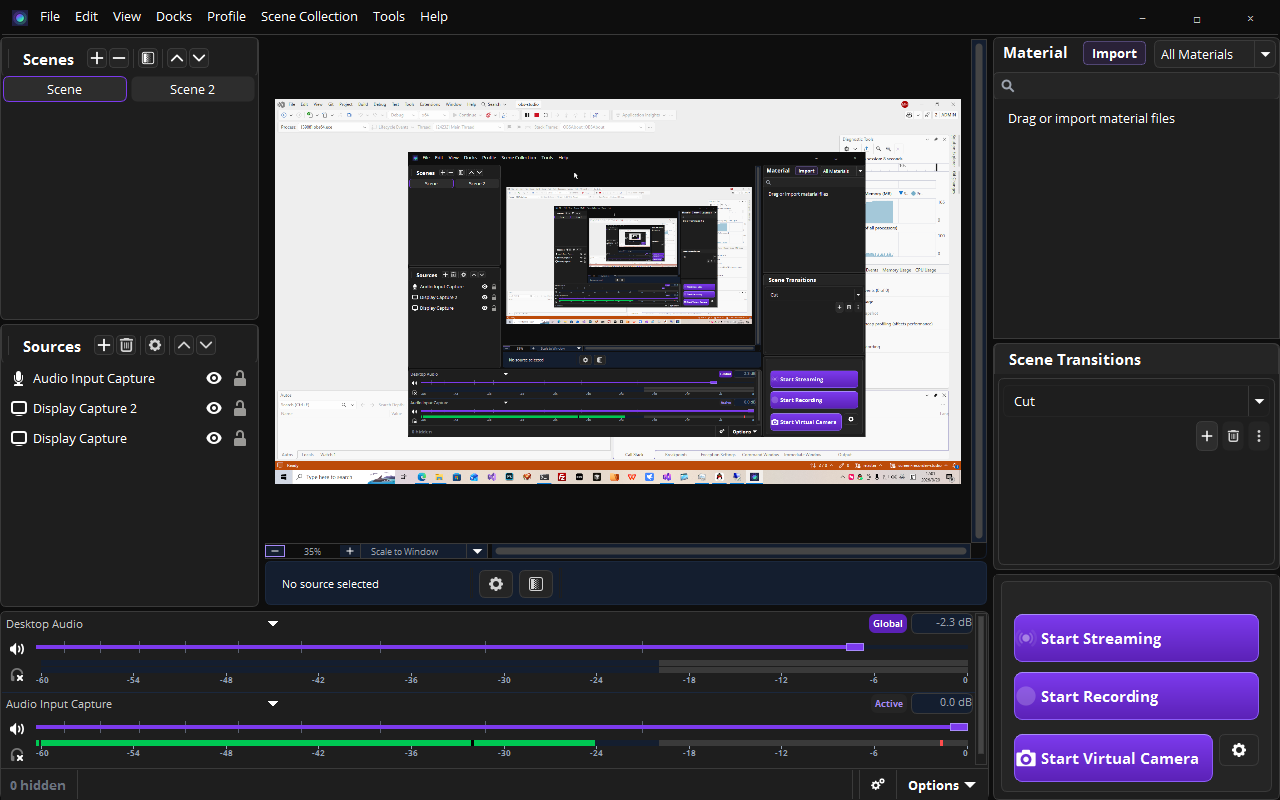
Main window layout
主窗口布局
1
Menu Bar (Top)
菜单栏(顶部)
Contains File, Edit, View, Scene, Docks, Tools, Profiles, and Help menus.
包含文件、编辑、视图、场景、停靠、工具、配置和帮助菜单。
2
Preview Area (Center)
预览区(中间)
Shows a live preview of what will be recorded. You can resize and position sources here.
实时预览将要录制的内容,可以在此调整源的大小和位置。
3
Sources Panel (Left)
源面板(左侧)
Add and manage your video sources: Display Capture, Window Capture, Image, Camera, etc.
添加和管理视频源:显示器捕获、窗口捕获、图片、摄像头等。
4
Controls (Bottom)
控制区(底部)
Start/Stop Recording, Studio Mode, and Settings buttons.
开始/停止录制、工作室模式和设置按钮。