
1. 控制条长什么样1. What the control bar holds
播放时鼠标动一下,窗口底部会出现一条控制栏,从左到右依次是:
While a video plays, move the mouse and a control bar appears along the bottom. Left to right:
- 喇叭图标:一键静音;右边的滑杆调音量;
- 慢放(左向双箭头)、−10 秒、播放/暂停、+30 秒、快放(右向双箭头);
- 中间是进度条,拖动可以定位;左边显示已播时间,右边显示总时长;
- 字幕图标:字幕选择;
- 全屏/缩放图标:切换全屏;
- …:更多菜单(音轨、画面比例等,见下一页)。
- Speaker — mute; the slider next to it sets the volume.
- Slow (double arrow left), −10 s, Play/Pause, +30 s, Fast (double arrow right).
- The seek bar in the middle; elapsed time on its left, total duration on the right.
- Subtitle icon — subtitle selection.
- Fullscreen / zoom icon — toggle fullscreen.
- … — the extra menu: audio track, aspect ratio and more (next page).
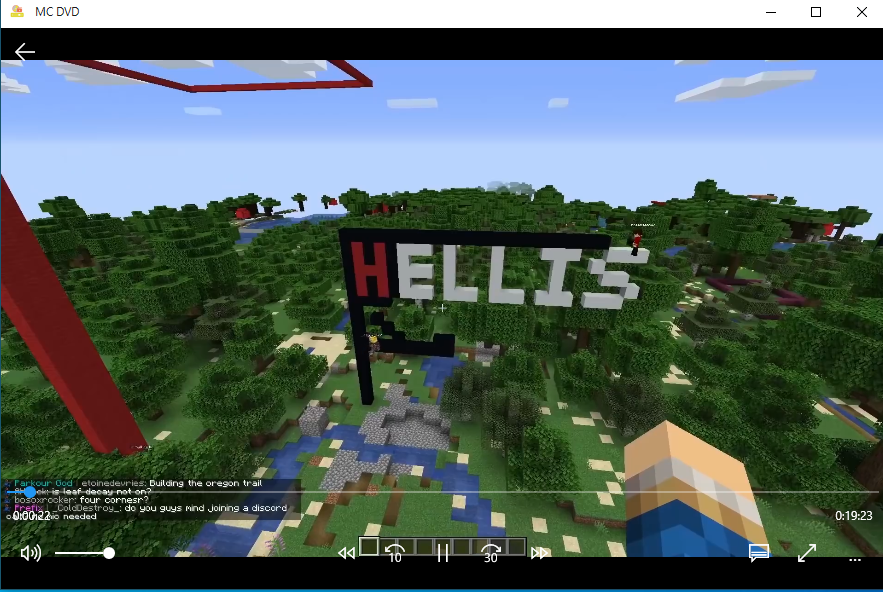
▲ 播放中:底部控制栏、右下角字幕与全屏按钮、最右侧「…」▲ During playback: the control bar, the subtitle and fullscreen buttons, and "…" on the far right
2. 几个顺手的小操作2. Small habits that help
| 想做的事To do this | 怎么做Do this |
|---|---|
| 回到主界面Back to the main window | 鼠标动一下唤出控制条,点左上角返回箭头 ←Move the mouse, then click the back arrow ← at the top left |
| 全屏 / 退出全屏Fullscreen on / off | 双击画面,或点右下角的全屏图标;再双击一次退出Double-click the picture, or click the fullscreen icon; double-click again to leave |
| 控制条挡住画面The bar covers the picture | 别动鼠标,约 3 秒后自动隐藏Stop moving the mouse — it hides itself after about 3 seconds |
| 快进 / 后退一点Nudge forward / back | 点 −10 秒 / +30 秒,或直接拖进度条Click −10 s / +30 s, or drag the seek bar |
声音太小:Sound too quiet:
先确认没静音(喇叭图标),再拉音量滑杆;如果还是小,就是片源本身的音量,和播放器无关。
Check the speaker icon is not muted, then raise the slider. If it is still quiet, the source file itself is quiet — not the player.