
1. 用光驱放盘1. Play a disc from the drive
- 把光盘放进光驱,点第一个标签 DVD Drives;
- 窗口里会出现本机光驱的卡片,上面写着驱动器名字和容量(例如 BD-ROM Drive (E:));
- 点这张卡片,会弹出一个 Select disc type 菜单,三个选项:VCD / DVD / Blu-ray;
- 选对了类型就开始播放。选错通常表现为黑屏或只有菜单,退回来换一个即可。
- Put the disc in the drive and open the first tab, DVD Drives.
- Each optical drive on the PC appears as a card showing its name and capacity, e.g. BD-ROM Drive (E:).
- Click the card: a Select disc type menu opens with VCD / DVD / Blu-ray.
- Pick the matching type and playback starts. Picking the wrong one normally shows a black screen or only the menu — go back and choose another.
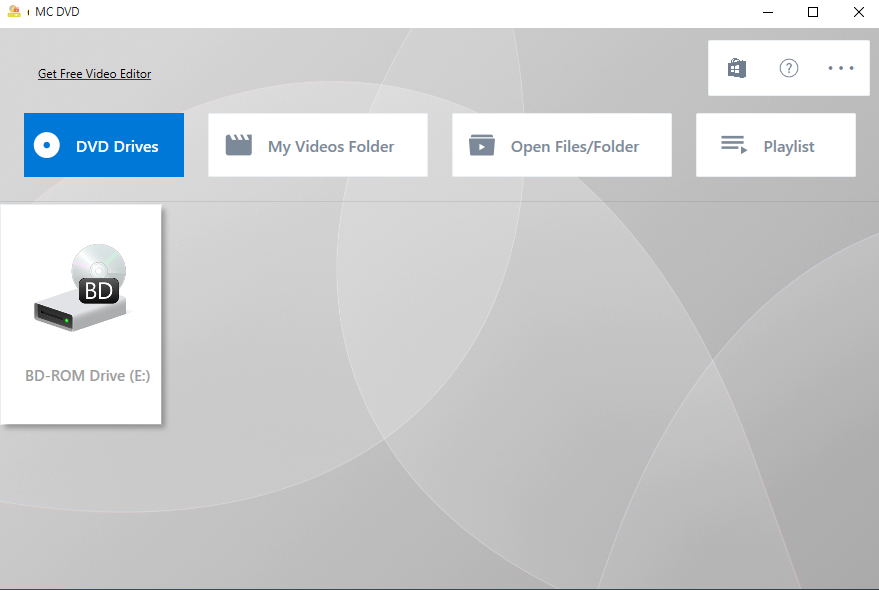
▲ DVD Drives 标签:这台机器的 BD-ROM 光驱(E:)▲ The DVD Drives tab: the machine's BD-ROM drive (E:)
2. 放已经拷出来的光盘文件夹2. Play a disc that is already copied to disk
手里是别人拷出来的 VIDEO_TS、BDMV 或 VCD 文件夹时,不用刻盘也不用虚拟光驱:
If you already have a VIDEO_TS, BDMV or VCD folder on disk, you do not need to burn it or mount an image:
- 点第三个标签 Open Files/Folder;
- 在 Choose Media Type 卡片里按来源选 VCD Folder / DVD Folder / Blu-ray Folder;
- 在弹出的 Select folder/drive 对话框里选中光盘根目录(DVD 选到包含
VIDEO_TS的那一层即可); - 确定后开始播放。
- Open the third tab, Open Files/Folder.
- In the Choose Media Type card pick VCD Folder / DVD Folder / Blu-ray Folder.
- In the Select folder/drive dialog choose the disc's root folder (for a DVD, the folder that contains
VIDEO_TS). - Confirm and playback starts.
3. 蓝光需要的那两个文件3. The two files Blu-ray needs
蓝光有 AACS 加密,播放需要两样东西同时到位:
Blu-ray uses AACS encryption, and playback needs two things in place:
- 解码库
libaacs.dll:应用自带,随安装包放在libvlc\win-x64\下。缺了它蓝光一定有问题。 - 密钥文件
keydb.cfg:应用每次启动都会把内置的 keydb 解到%APPDATA%\aacs\,正常情况下不用管。
- The decoding library
libaacs.dll, shipped with the app underlibvlc\win-x64\. Without it Blu-ray cannot work. - The key file
keydb.cfg, which the app extracts from its bundled keydb into%APPDATA%\aacs\on every start. Normally you never touch it.
看到「Blu-ray Configuration Incomplete」怎么办:If you see "Blu-ray Configuration Incomplete":
说明上面两样至少缺一样。先确认
%APPDATA%\aacs\keydb.cfg 存在(没有就重启一次应用让它重新解压),再确认应用目录下的 libaacs.dll 没被杀毒软件删掉。
One of the two is missing. First check that %APPDATA%\aacs\keydb.cfg exists (restart the app once to re-extract it), then make sure libaacs.dll in the app folder was not removed by antivirus.
DVD 和 VCD 不需要这些:DVD and VCD need neither:
这两种盘的播放不依赖 AACS,插进去直接放就行。
those two do not depend on AACS — just insert the disc and play.