
9. 设置9. Settings
主界面点 Settings 卡片,或工具条上的齿轮。左侧三页:About / General / ShortKey。
Click the Settings card on the home screen, or the gear on the floating toolbar. Three pages on the left: About, General, ShortKey.
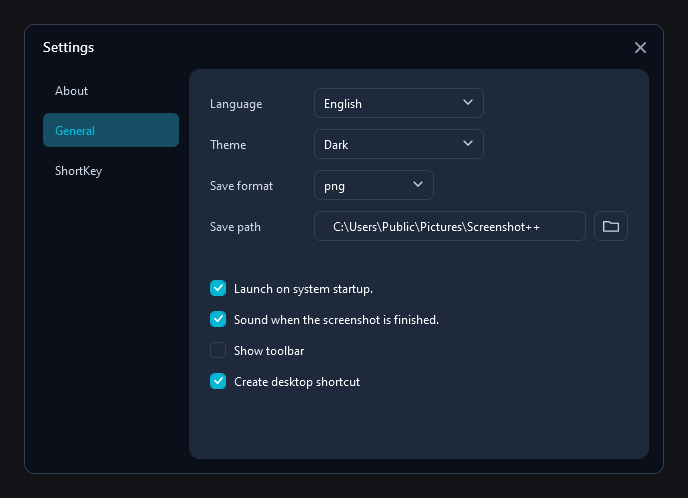
▲ General:语言、主题、保存格式与目录,四个开关▲ General: language, theme, save format and folder, four switches
GeneralGeneral
| 项Setting | 说明Notes |
|---|---|
| Language | 12 种界面语言:Auto(跟随系统)、English、中文、Deutsch、Español、Français、Italiano、日本語、한국어、Nederlands、Português、Русский。关掉设置窗口后生效。12 interface languages: Auto (follow Windows), English, Chinese, German, Spanish, French, Italian, Japanese, Korean, Dutch, Portuguese, Russian. Applies after you close Settings. |
| Theme | System(跟随系统)/ Light / Dark。整窗换肤要重启程序才彻底生效。System, Light or Dark. A full re-skin needs a restart to reach every window. |
| Save format | png(默认,文字最清晰)/ jpg / bmp 等;影响「保存」与「整屏存文件」。png (default, sharpest for text), jpg, bmp and more; applies to Save and to full-screen-to-file. |
| Save path | 截图存到哪。右侧文件夹按钮选目录;目录被删时会尝试重建,失败才退回「图片」根目录。Where shots go. Use the folder button to pick a directory; if it disappears the app recreates it, and only falls back to your Pictures root if that fails. |
| Launch on system startup | 登录后以托盘模式自动启动,不弹窗。首次安装默认开启。Starts in the tray at sign-in without a window. On by default after a fresh install. |
| Sound when the screenshot is finished | 截图/保存成功时响一声。A short sound when a capture is taken or saved. |
| Show toolbar | 用悬浮工具条代替主界面(第 8 页)。Use the floating toolbar instead of the home window (page 8). |
| Create desktop shortcut | 在桌面放 Screenshot++.lnk;取消勾选会删掉它。Keeps Screenshot++.lnk on the desktop; unticking removes it. |
ShortKeyShortKey
这里列出所有可绑定的动作:截取区域、截取到文件,以及矩形/椭圆/直线/箭头/铅笔/马赛克/文字等每个标注工具。点输入框后直接按下想要的组合键即可录制;Set Default 一键恢复默认(区域 Ctrl+Alt+S、存文件 Ctrl+Alt+F)。
Every bindable action is listed here: capture area, capture to file, and each annotation tool (rectangle, ellipse, line, arrow, pencil, mosaic, text and so on). Click a box and press the combination you want; Set Default restores the defaults (Ctrl+Alt+S for an area, Ctrl+Alt+F to save a full screen).
AboutAbout
- 顶部是程序名与版本号——反馈问题时请带上这个版本号。
- Tutorial 打开本教程,Rate us 打开商店评价,Donate、Privacy 是对应外链。
- Feedback 会用默认邮件程序写信,正文已填好版本与系统;本机没有邮件程序时,可以改用网页邮箱或复制收件地址。
- The top shows the product name and version — quote that version when you report a problem.
- Tutorial opens this page, Rate us opens the Store review, Donate and Privacy open their links.
- Feedback composes a mail with your version and OS already filled in; without a mail app it falls back to a web mailbox, then to copying the address.