
How to Convert PDF to Excel
如何将 PDF 转 Excel
Extract tables and data from PDF documents into editable Excel spreadsheets (.xlsx / .xls). Supports page range and OCR for scanned tables.
将 PDF 文档中的表格和数据提取为可编辑的 Excel 表格(.xlsx/.xls)。支持页范围,扫描表格支持 OCR 识别。
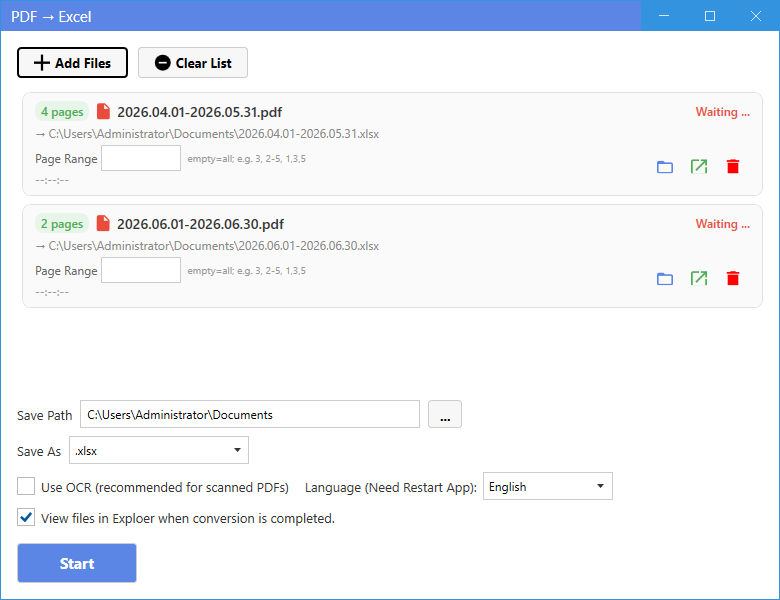
New UI
新版界面
- On the home page, click PDF to Excel in the “PDF to Other Formats” section.
- Click Add Files and select one or more PDF files.
- Choose the output format: .xlsx (Excel 2007+) or .xls (Excel 97-2003).
- Optionally set a page range — leave empty for all pages, or enter e.g. 2-5, 1,3.
- For scanned tables, tick Use OCR and choose the language so text becomes editable.
- Click Start. When finished, use the folder / open buttons in the list to locate the result.
- 在主页“PDF 转其他格式”区域点击 PDF 转 Excel。
- 点击添加文件,选择一个或多个 PDF 文件。
- 选择输出格式:.xlsx(Excel 2007+)或 .xls(Excel 97-2003)。
- 可按需设置页范围——留空为全部页,或输入如 2-5、1,3。
- 扫描表格可勾选使用 OCR 并选择语言,使文字可编辑。
- 点击开始转换。完成后可用列表中的“文件夹/打开”按钮定位结果。
Classic Mode
经典模式
- In Classic Mode, click the corresponding card on the home page, add your files, set options if needed, and press Start.
- 在经典模式中,点击主页对应卡片,添加文件,按需设置选项后点击开始。
Tip: OCR helps a lot for scanned or image-based tables — enable it for the best result.
提示:扫描或图片型表格建议开启 OCR,效果最佳。