
How to Convert Excel to PDF
如何将 Excel 转 PDF
Convert Excel spreadsheets (.xlsx / .xls) to PDF with flexible page layout options: fit columns/rows/sheet on one page, grid lines and orientation.
将 Excel 表格(.xlsx/.xls)转换为 PDF,支持灵活的页面布局选项:所有列/行/整表一页、网格线与方向。
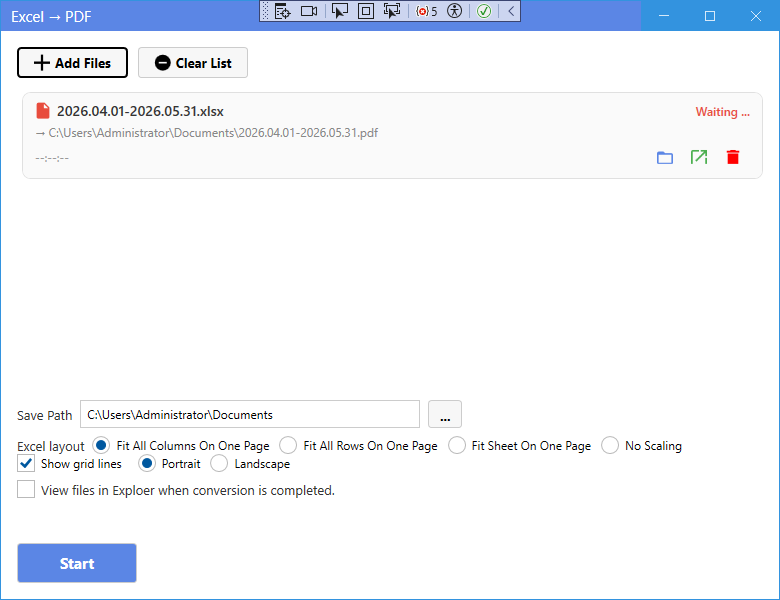
New UI
新版界面
- On the home page, click Excel to PDF.
- Click Add Files and select .xlsx or .xls files.
- Choose the page layout: Fit All Columns (default), Fit All Rows, Fit Sheet, or No Scaling.
- Tick Show grid lines if you want the spreadsheet grid to appear.
- Choose the orientation: Portrait or Landscape.
- Click Start to convert.
- 在主页点击 Excel 转 PDF。
- 点击添加文件选择 .xlsx 或 .xls 文件。
- 选择页面布局:所有列一页(默认)、所有行一页、整表一页 或 不缩放。
- 需要显示表格网格线时勾选显示网格线。
- 选择方向:纵向 或 横向。
- 点击开始转换。
Classic Mode
经典模式
- In Classic Mode, click the corresponding card on the home page, add your files, set options if needed, and press Start.
- 在经典模式中,点击主页对应卡片,添加文件,按需设置选项后点击开始。
Tip: “Fit All Columns On One Page” is usually the best choice for wide tables.
提示:宽表格通常选择“所有列放到一页”效果最佳。