Cool Office Suite Help
Welcome to the Cool Office Suite Help. This help center contains complete tutorials and reference documentation for all Cool Office Suite modules, adapted for users of the Cool Office Suite office suite.
The Help references the default settings of the program on a system that is set to defaults. Descriptions of colors, mouse actions, or other configurable items can be different for your program and system.
The Help system for all versions of the software is based on the same source files. Some of the functions described in Help may not be included in this particular distribution.
Getting Started with the Start Center
When you launch Cool Office Suite, the Start Center is your home screen. It is the fastest way to create new documents, open recent files, and jump straight into Writer, Calc, Impress or Draw.
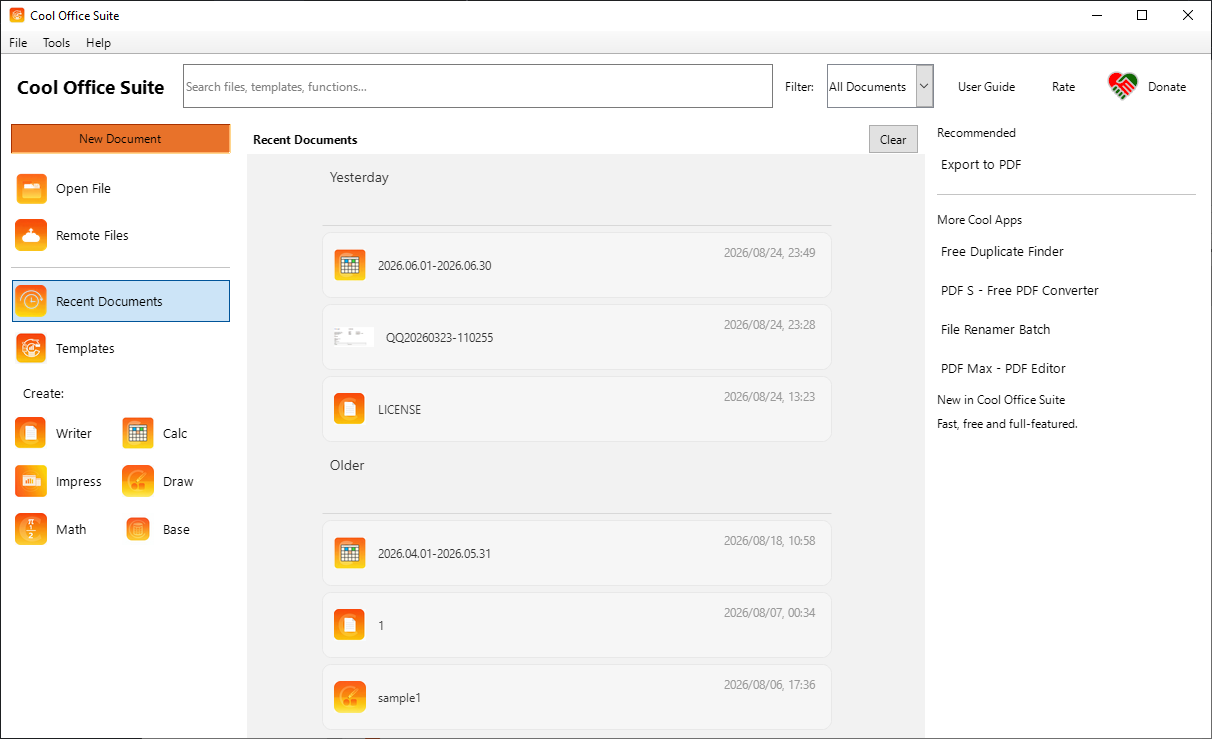
The Start Center — create, open and manage your documents from a single place.
- Pick a module (Writer, Calc, Impress, Draw, Math or Base) to create a new document, or press Open to load an existing file.
- Your recently used documents are listed and grouped by date (Today / Yesterday / Older) for quick access.
- Use the search box at the top to filter your recent files instantly by name.
Choose a Module
The following modules are covered in this help center. Click a module to open its tutorials.
Text Documents (Writer)
169 help topics
HTML Documents (Writer Web)
3 help topics
Spreadsheets (Calc)
158 help topics
Presentations (Impress)
87 help topics
Drawings (Draw)
67 help topics
Database Functionality (Base)
10 help topics
Formulas (Math)
22 help topics
Charts and Diagrams
3 help topics
Common Help Topics
133 help topics